Internet Explorer
Internet Explorer is not supported. Please upgrade to a more modern browser.
Getting Started
If you're new to the server or just need help with commands on the server, this is the page for you.
Firstly, make sure to claim your land. Your first land claim will be automatically created when you place down a chest.
You can resize the claim OR make a new claim using a golden shovel. Just right click while holding the shovel on two points.
Right click while holding a stick to check for existing claims. Don't build too close to someone unless they're OK with it.
Players automatically get 100 claimblocks per hour of play time. You can get more by voting.
Please note that claims will automatically expire after 30 days if you don't login.
You'll probably want to find a nice spot to build your house.
You can either walk through the fixed-point portal at spawn or you can use the /rtp command to randomly teleport to a location on the map.
You can use this command every 10 minutes, at a maximum of 10 times per day.
VIP ranked players have more biomes unlocked in the RTP Biome selector.
After you've found your ideal building spot, make sure you save the location with /sethome (name) so you can return to it later.
You can set up to 3 homes, eg: /sethome farm or /sethome cave.
The last bed you slept in is saved when you sleep. You can return to your bed (if it exists) with /home bed.
Every player start with $500 TakoCoins. You can pay other players with /pay.
There is a mall on the server where players can rent a shop and sell items.
You can get to the mall either by going through the portal at /spawn or by typing /warp mall
You can earn TakoCoins by selling items to the server with /sell.
For example, if you want to sell an item you're holding, type /sell hand to sell it to the server for TakoCoins.
You can check the price of an item by holding it in your hand and typing /price or /worth. Note that not all items can be sold to the server.
You can trade with other players directly without meeting them by typing /trade (username). Place the item you want to trade in the top section.
You can also add TakoCoins to the trade by clicking the gold nugget as seen below: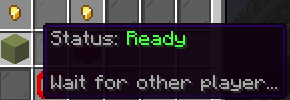
Type the amount of TakoCoins you want to add to the trade then click the paper to confirm: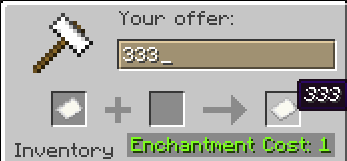
When both players are ready to trade, click the block under the gold nugget, it will turn green and the trade will complete.